Storage runs out at the worst moment. A quick search for a fix throws up a dozen tools with wildly different price tags, and comparing Mac cleaner software price against what each one actually does gets confusing fast. Free, trial, subscription, one-time payment. Same category, four money models, and none of them line up neatly.
Why Four Price Models Turn One Simple Choice into a Mess
The Cost Column Hides More than It Shows: Two tools can carry the same number and deliver nothing alike. One scans a fixed list of folders. The other walks the whole home folder, hidden directories included. Mac cleaner software price only becomes useful once you know the scan depth behind it, because depth decides how much space actually comes back.
Free Rarely Means Free for Long: Searching for the best free Mac cleaner software usually lands you on a tool that scans without charge and then asks for payment before it removes anything. That is not dishonest. Analysis costs the developer very little. Removal is where the real work sits, and that is where the money question starts.
What Your Money Buys beyond the Scan Button
Subscriptions Changed How Utilities Get Sold: Most utility developers moved to software as a service billing, where the tool keeps working only while payments keep arriving. Stop paying and the scan results stay locked behind a renewal screen. Yearly charges look small in isolation. Five years in, the total looks very different from the first invoice.
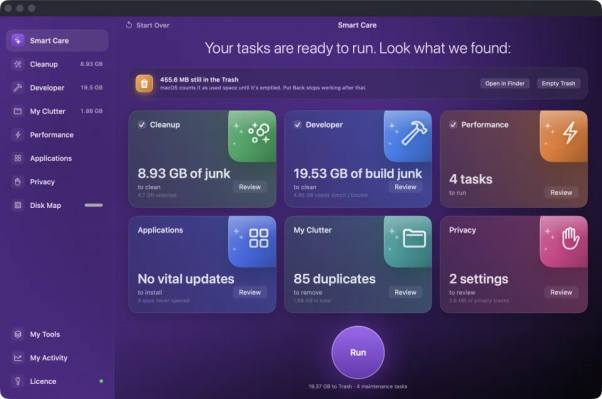
Features That Actually Justify a Paid Tool: Four things separate a paid cleaner from a basic one. Deep scanning across app caches and developer folders. A visual disk map showing where the weight sits. A proper uninstaller that clears leftovers by bundle identifier. Full file review before removal. Weigh Mac cleaner software price against that list, not against a number alone.
One Payment or an Annual Habit
The Renewal Math Most Buyers Skip: Run the total cost of ownership over three or four years and the gap opens wide. A one-time license bought for a single Mac costs what it costs. A yearly plan keeps billing whether the Mac still needs cleaning or not. Few buyers run that number before they hand over a card.
- Trial access, and whether every feature is unlocked or only the scan
- Where removed files land. Trash first means a mistake can be undone
- How many Macs a single license covers
- Whether anything the tool only guessed at arrives pre-ticked
- License transfer, because the old Mac gets replaced eventually
When a Free Tool Is Enough: Light users with plenty of space rarely need a paid tool. The best free Mac cleaner software will show you the problem, and for some people seeing it is enough. Manual deletion through Finder handles the rest. Once the same clutter comes back every month and the manual sweep eats an evening, paying starts to make sense.
See Your Own Numbers before You Pay Anything
The safest way to settle this is to run a scan on your own machine and look at the real figure. A trial that unlocks every feature for three days gives you that answer without a card. Download one, check what comes back, then decide whether the license earns its place.